Loading...
Immeuble Nour El Bouhaira, 1053, Rue du Lac Turkana, Tunis
Mon - Fri : 08.30 AM - 05.30 PM
+216 71 861 202
AdriaScan IDDEX

AdriaScan Passport & ID Scanner

Scan a passport or ID card and the guest profile is filled in OPERA in seconds. Faster check-in, no typing errors and easier police reporting for your front desk.

Integrated with OPERA PMS Passports, ID cards & residence permits Supplied and supported by OSBC
AdriaScan passport scanner with passports
Key benefits

Check-in in seconds, without typing

AdriaScan reads travel documents and sends the data directly to your property management system.

Faster check-in

Guest data is captured in seconds instead of minutes, even for large groups.

No typing errors

Names, dates and document numbers are read automatically from the document.

OPERA integration

Profiles are created or updated directly in OPERA PMS.

Document checks

Checks of document validity and expiry dates help detect anomalies.

Police reporting

Guest data is ready for the reports required by local authorities.

Data protection

Images and data are handled securely and stored only where needed.

How it works

From the passport to the guest profile

Three simple steps at the front desk.

Passport placed on the AdriaScan reader
01 · Scan

Place the document on the reader

The receptionist places the passport or ID card on the scanner. The machine-readable zone and the photo page are captured in a second.

  • Passports, ID cards and residence permits
  • Reads the machine-readable zone (MRZ)
  • Compact desktop scanner
AdriaScan software logo
02 · Check

Data is read and checked

AdriaScan extracts the guest details and checks the document, so the receptionist only needs to confirm.

  • Automatic data extraction
  • Expiry and consistency checks
  • Clear confirmation screen
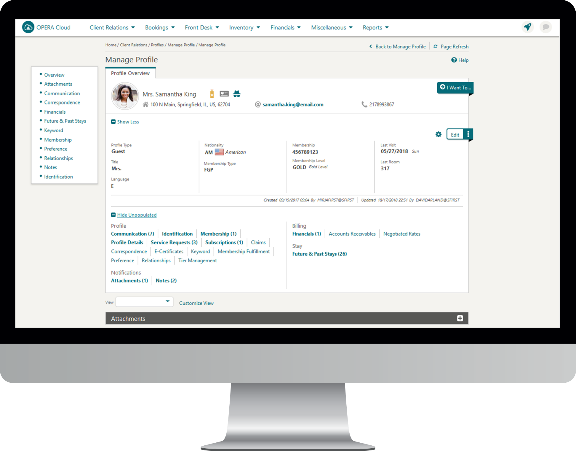
Guest profile in OPERA Cloud
03 · Save

The guest profile is filled in OPERA

With one click, the data is sent to OPERA PMS. The guest is checked in and the information is ready for reporting.

  • New profile or update of an existing one
  • Linked to the reservation
  • Ready for police reporting
Video

See AdriaScan in action

Our approach

Simple to deploy

A local OSBC team guides you through every step.

Analysis

We review your front desk workflow and documents.

Hardware

Scanners are installed at each reception workstation.

Integration

AdriaScan is connected to your OPERA PMS.

Settings

Fields, checks and reports configured for your needs.

Training

Your receptionists are trained in a short session.

Support

Ongoing support and updates by OSBC.

At a glance

Works with

Oracle OPERA PMS v5 OPERA Cloud Passports National ID cards Residence permits Driving licences

Make check-in faster at your hotel

Ask for a demonstration of AdriaScan with your OPERA system.